Static charging
Prerequisites for implementation:
-
Have a Celcoin API key, for more information access this link
-
Have familiarity with Rest APIs using the OAuth 2.0 protocol.
-
Have the product/solution enabled - if you want to purchase the functionality, please contact our sales team via email corp@celcoin.com.br . For technical questions, simply contact support via the link .
-
Have a registered Pix key - if your company does not have one, simply contact our support team and request that it be created. We do not register keys such as: CNPJ, email, or telephone, due to the possibility of fraud.
To enable receiving the QR Code, you must use the key above linked to your credential.
This functionality should be used whenever it is necessary to create just one QR Code to charge your users. Celcoin customers generally use it when they need to receive Pix transfers to enable credits in their application, or when their user wants to create a QR Code to receive amounts, for example a live on Twitch and YouTube.
Use case:
As a Fintech, I want to make available to my users the possibility of charging instantly with just a QR Code, where when created it is possible to display it somewhere, in this way, it can be scanned and a transfer of the desired amount can be made.
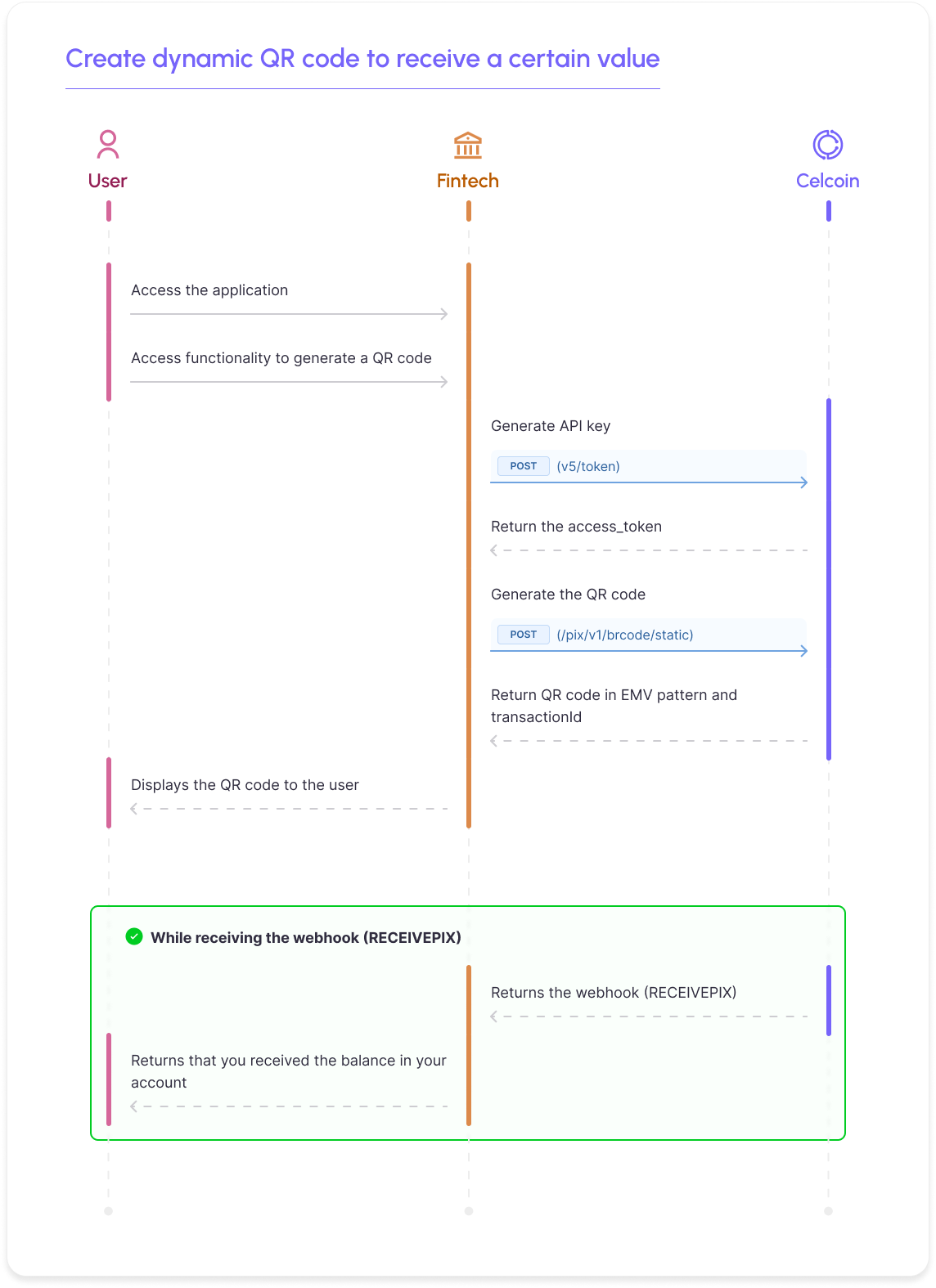
Creating a static QR Code
To create a static QR Code, you must make the Create a static QR Code API call.
Request model:
cURL
curl --location 'https://sandbox.openfinance.celcoin.dev/pix/v1/brcode/static' \ --header 'Content-Type: application/json' \ --header 'Authorization: Bearer {access_token}' \ --data '{ "key": "a016bc8b-d89a-4f62-be899-5fa0ebb91d77", "amount": 10.55, "transactionIdentification": "testqrcodestaticcelcoin1", "merchant": { "postalCode": "01201005", "city": "Barueri", "merchantCategoryCode": 0, "name": "Celcoin" }, "tags": [ "string" ], "additionalInformation": "Referente ao custo de...", "withdrawal": false, "withdrawalServiceProvider": "13935893" }'
Perceba que é necessário preencher o campo key com a sua chave Pix da Celcoin que será habilitada uma vez que você for aprovado no processo de homologação.
If you are performing sandbox tests, we recommend using the key testepix@celcoin.com.br, as our environment is prepared to perform tests with it.
O campo transactionIdentification é opcional na geração do QR Code, o mesmo é utilizado para identificação do QR Code. Se informado, ele deve possuir no máximo 25 caracteres alfanuméricos, ou seja, letras e números.
Dentro do objeto merchant deve ser populado os dados da sua empresa, sendo eles postalCode (CEP), city (cidade), name (nome da empresa) O limite é de até 140 caracteres para esse campo e isso é determinado pelo Banco Central. O restante das propriedades não são obrigatórias.
Return model:
JSON
{ "transactionId": 9179311, "emvqrcps": "00020126730014br.gov.bcb.pix0123testepix@bcelcoin.com.br0224Referente ao custo de...520400005303986540510.555802BR5907Celcoin6007Barueri61080120100562270523testqrcodestaticcelcoin6304C3A1", "transactionIdentification": "testqrcodestaticcelcoin" }
In the emvqrcps property, a code will be returned to create the static QR Code.
We recommend that you store the transactionIdentification on your side, so that you can receive the charge status from Celcoin via webhook.
Receiving collection status with trigger
A webhook is a way of receiving information asynchronously, where triggers are generally fired, in JSON format, when an event occurs. If the payment is successful, Celcoin fires a trigger ( RECEIVEPIX ) in its webhook.
To configure a webhook, you must contact our support team, providing your webhook URL, password and username, in BASIC format . This way, they will register you on our platform so that triggers can be sent.
Webhook template:
JSON
{ "RequestBody": { "TransactionType": "RECEIVEPIX", "TransactionId": 56762766, "Amount": 150.55, "DebitParty": { "Account": "416781236", "Bank": "18236120", "Branch": "1", "PersonType": "NATURAL_PERSON", "TaxId": "01234567890", "AccountType": "CACC", "Name": "Fulano de Tal" }, "CreditParty": { "Bank": "13935893", "Branch": "1", "Account": "123456789", "PersonType": "NATURAL_PERSON", "TaxId": "09876543210", "AccountType": "CACC", "Name": "Cicrano de Outro", "Key": "8ea152b1-ddee-ssaa-aass-ce98245349aa" }, "EndToEndId": "E18236120202001199999s0149012FPC", "transactionIdentification": "meuClientRequestId0014534", "transactionIdBRCode": "meuClientRequestId0014534" } }
It is very important that the partner validates the amount charged and the amount reported in the " Amount " field of the receiving webhook, in order to reconcile the expected amount with the amount actually paid and avoid possible losses.
Application example
We created a prototype application to exemplify the use of the API:
Se entre o ato de emitir o Qr Code Pix (de qualquer natureza) e o momento do efetivo pagamento a chave Pix associada aquele Qr Code for excluída, ao tentar ler o Qr Code Pix, o banco pagador retornará um erro ao cliente que não foi possível encontrar aquela chave Pix ou ler aquele Qr Code. Esse retorno ocorrerá no ambiente do banco pagador e a Celcoin não tera visibilidade do mesmo. É importante não excluir chaves Pix associadas a Qr Codes que ainda estejam em aberto.