About DDA
Authorized Direct Debit, known as DDA, is a tool developed by Febraban and has been in use since 2009, facilitating the payment of bills and assisting in financial planning.
DDA allows electronic access to bills issued under a specific CPF or CNPJ, eliminating the need to have them on paper. It is important to highlight that the DDA is only the electronic visualization of the charge, that is, the user continues to decide how and when to make the payment. Failure to make payment via internet banking will be subject to the same rules as failure to make payment via physical banking.
Nesse artigo você irá aprender sobre:
- Advantages of DDA
- Difference between DA and DDA
- Types of charges that DDA returns
- Configure webhooks
- Register and delete DDA user
- Bill notifications
- homologation.
Prerequisites for implementation:
- Have a unique Celcoin API key, for this you need to ask support to create a user. Contact support here .
- Have familiarity with Rest APIs using the OAuth 2.0 protocol.
- If you have purchased the product/solution, if you want to use the functionality, please contact our sales team via email at corp@celcoin.com.br. For technical questions, simply contact support via the link .
Advantages of DDA
With DDA, it is possible to complete the payment of the bill directly through internet banking and this reduces the risk of errors when entering the barcode when paying. Furthermore, the user has greater control over their finances, as they can map all accounts issued under their CPF/CNPJ.
For Fintechs, DDA allows obtaining new debts and all the information necessary to pay bills through digital channels. In addition to centralizing debt management and improving visibility of the history of any periodic expenses by CPF and CNPJ.
Difference between DDA and DA
In Direct Debit (DA), you need to register the charge using the invoice identification code only once. After that, on the due date of the debit, the payment will be made automatically, withdrawing the balance from the account. The DA is linked to recurring charges from agreements such as: Vivo, Tim, Cemig, Sabesp, Enel, etc.
With authorized direct debit (DDA), it is possible to consult accounts payable and even be notified of outstanding bills, but user action is required to authorize payment. In other words, payment is not made automatically. In addition, charges related to DDA are bank slips registered by financial institutions generated through CIP, such as school fees, for example.
Types of charges returned in DDA
All billing statements registered by banking institutions, including rent, health insurance, condominium, school fees, clubs, card bills, purchases made using a bill, etc.
Types of charges that do not return in DDA
Non-bank charges such as utility bills (water, electricity, etc.) and taxes (IPVA, IPTU).
Use case
As a Fintech, I want to notify my users about all the outstanding bills they have so they can make the payment in my app.
Consulte a Recipe do produto com o passo a passo, requests e responses:
📝
[cel_credit] Enviar arquivo assinado por outro Provedor
Open Recipe
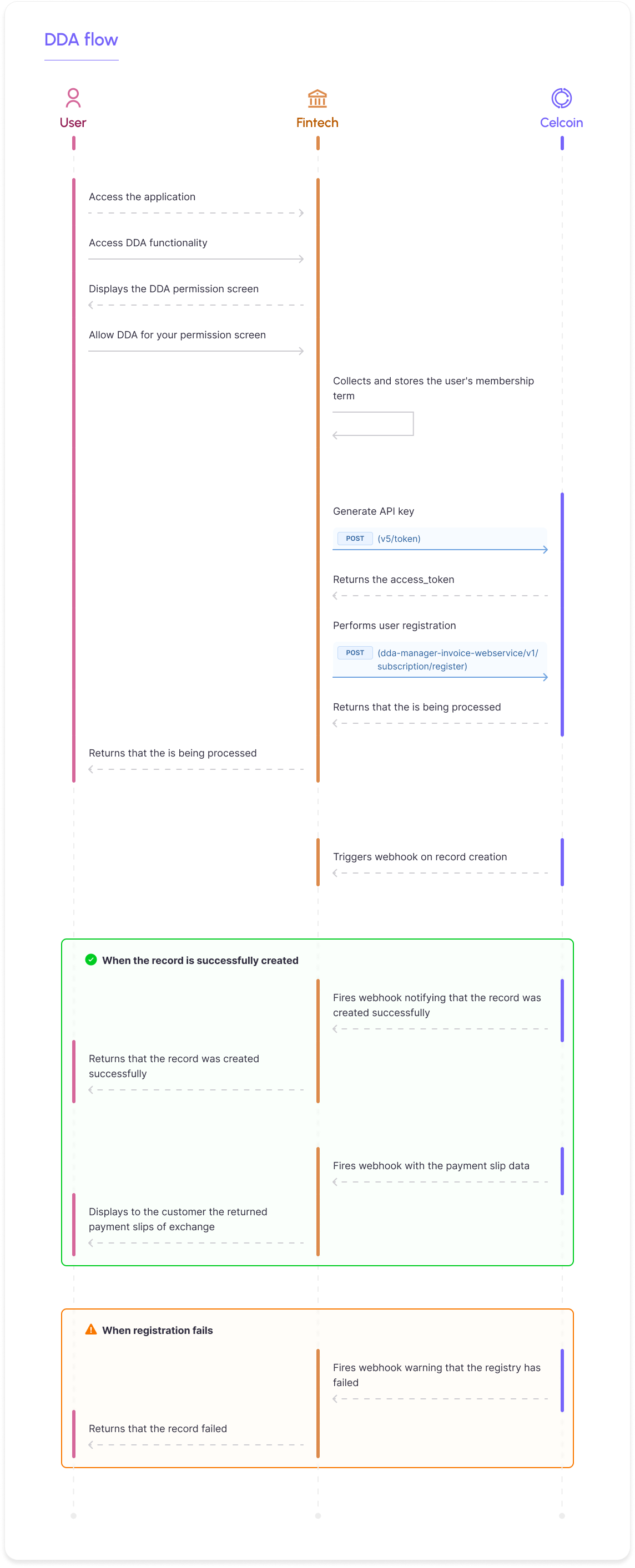
In order to show how DDA and the presentation of payment slips can be enabled for a user, we created this presentation that simulates the entire process:
How DDA works
To enable DDA for the user, it is necessary to create a signature using their CPF or CNPJ. In this registration, the user must be asked to accept the membership terms, as set out in this link . This means that, in addition to the user's acceptance to register with the DDA, it is necessary to collect the name, document (CPF or CNPJ), address, email and telephone number.
Attention!
The collection of data and user acceptance of the DDA membership term is mandatory. The document must be stored by Fintech and it may be requested by Celcoin through an internal audit or at the request of Bacen.
DDA works asynchronously, meaning that the request is made but the return is sent via webhook notifications after they are processed. Then, notification is sent about the registration and deletion of the subscription and notification about the payment slips.
It is important to note that registration and deletion only work on weekdays and within a window of 6 am to 10 pm. When requested on a non-business day, registration or deletion will be scheduled for the next business day.
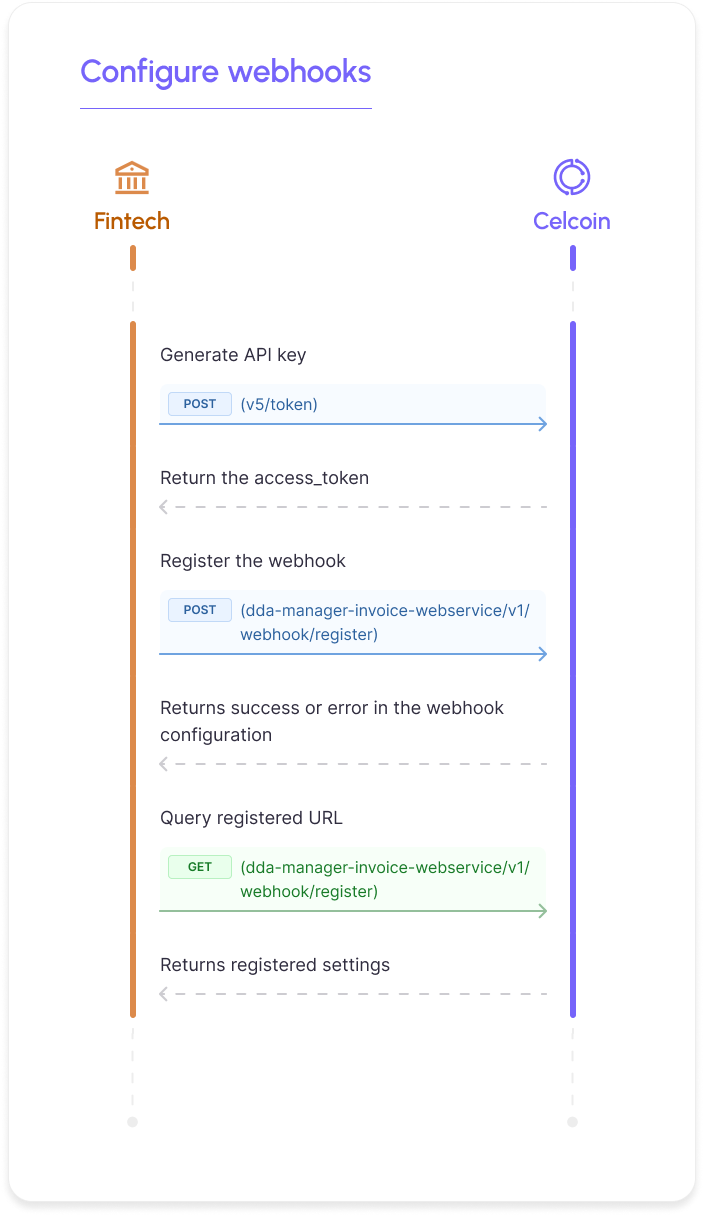
Here's how to set up webhooks:
Configure webhooks
To configure the receipt of DDA notifications, you must perform a POST in the Configure webhooks API, informing the URL that will receive the webhooks, which events you want to receive and authentication (if any).
List of events:
Subscription: all notifications related to user registration in DDA.
Deletion: all notifications regarding user deletion in DDA.
Invoice: all notifications related to users' bills.
Request model:
JSON
curl --location --request POST 'https://sandbox.openfinance.celcoin.dev/dda-servicewebhook-webservice/v1/webhook/register' \ --header 'Content-Type: application/json' \ --header 'Accept: application/json' \ --header 'Authorization: Bearer {{access_token}}' \ --data-raw '{ "typeEventWebhook": "Invoice", "url": "https://webhook.site/d24aa98f-1837-4698-8825-688f94390cfe", "basicAuthentication": { "identification": "João", "password": "Um@Pro7ec@o" } }'
Response model:
JSON
{ "status": 201, "body": { "typeEventWebhook": "Invoice", "url": "https://webhook.site/d24aa98f-1837-4698-8825-688f94390cfe", "basicAuthentication": { "identification": "João", "password": "Um@Pro7ec@o" }, "oAuthTwo": null } }
The field typeEventWebhook defines which event is being configured in the request, as described in the event list, and the field url defines the address to which notifications for that event will be sent. It is possible to configure a different URL for each event. The request configures one event at a time, that is, it is necessary to make 3 requests to configure all notification events (even if using the same URL).
Additionally, you can configure access permission to your URL using two methods: basicAuthentication or oAuthTwo. The configuration basicAuthentication requests the identification which works as the login and password which is the password. Both fields are mandatory if you select this authentication type.
Example of just the basicAuthentication authentication snippet:
JSON
Exemplo: "basicAuthentication": { "identification": "João", "password": "Um@Pro7ec@o" }'
To configure oAuthTwo, which works as an access token authentication, you must inform:
- endpoint: que é a URL para autenticação. Ex: https://yoursite.net/oauth
- grantType: grant type. Ex: client_credentials
- clientId: identificador do cliente. Ex: 41b44ab9a56440.teste
- clientSecret: client secret key. Ex: e9d15cde33024c1494de7480e69b
- scope: escopos registrados com o aplicativo. Ex: vso.profile
- state: used to generate a random string and include it in the request, this serves to prevent CSRF attacks. Ex: xcoiv98y2kd22vusuye35qq
- code: grant type client authorization code. Ex: 4BV8LHVNl49hy5qKF8yyKetGJNjCfJ6K1KvFJn5WSA==
- refreshToken: check the ID (Access Token) from time to time, access tokens expire quickly. Ex: eAW8CpgUcWCDv5lM+G5RwJOvWMnK0VAg1O1nFQjRw==
- contentType: tipo de mídia para o recurso. Ex: application/json
If you choose this authentication, the fields endpoint, grantType, clientId and clientSecret are mandatory.
Example of just the oAuthTwo authentication snippet:
JSON
"oAuthTwo": { "endpoint": "https://yoursite.azurewebsites.net/oauth/callback", "grantType": "client_credentials", "clientId": "CBA114E0-02A7-44CC-9D65-2DB588B58DBE", "clientSecret": "eyJ0eXAiOiJKV1QiLCjhbGciOiJSUzl1Nils", "scope": "vso.profile vso.agentpools", "state": "string", "code": "", "refreshToken": "", "contentType": "application/json" }
To update the URLs, simply send a new request for the same type of event, as it will overwrite the previous one.
Know that:
Caso a Celcoin não receba do cliente o status de sucesso no recebimento das notificações. É realizado 100 novas retentativas com intervalo de 1 minuto entre elas.
Query webhooks
It is possible to consult the configuration used to receive webhooks, i.e., check which URL is registered for each event. To do this, you need to perform a GET on the Consultar webhooks API.
Request model:
JSON
curl --location --request GET 'https://sandbox.openfinance.celcoin.dev/dda-servicewebhook-webservice/v1/webhook/routes' \ --header 'Content-Type: application/json' \ --header 'Accept: application/json' \ --header 'Authorization: Bearer {{access_token}}'
Response model
JSON
{ "status": 200, "body": [ { "typeEventWebhook": "Invoice", "url": "https://webhook.site/adf0d812-3e2d-43cc-91be-3d84128d27ab" }, { "typeEventWebhook": "Deletion", "url": "https://webhook.site/adf0d812-3e2d-43cc-91be-3d84128d27ab" }, { "typeEventWebhook": "Subscription", "url": "https://webhook.site/adf0d812-3e2d-43cc-91be-3d84128d27ab" } ] }
In this request, the typeEventWebhook indicates which event is configured and the url is the address defined to receive notifications for the previously specified event. If there is a configuration for more than one event, more than one configuration will be returned (as per the example above).
Register user
To access the DDA, the user must be registered and give permission by accepting the membership terms . User registration in the DDA is also called subscription or registration.
To sign, you must make a POST in the Register User API, providing the user's name and document (CPF or CNPJ). Additionally, the clientRequestId field is an external transaction identifier, provided by the client to be able to identify the request on its side.
Request model:
JSON
curl --location --request POST 'https://sandbox.openfinance.celcoin.dev/dda-subscription-webservice/v1/subscription/Register' \ --header 'Content-Type: application/json' \ --header 'Accept: application/json' \ --header 'Authorization: Bearer {{access_token}}' \ --data-raw '{ "document": "23155663049", "clientName": "Celcoin Customer", "clientRequestId": "0001" }'
Response model:
JSON
{ "status": 201, "body": { "document": "23155663049", "clientRequestId": "0001", "responseDate": "2022-11-17T14:03:06.4688394+00:00", "status": "PROCESSING", "subscriptionId": "bfacff76-de86-4b8d-9797-4ea565b4f60d" } }
Response structure:
| Field | Type | Description |
|---|---|---|
| status | int | Request http status |
| document | string | User document (CPF or CNPJ) for which registration was requested in the DDA |
| clientRequestId | string | Unique transaction identifier, provided by the customer |
| responseDate | datetime | Date and time of registration request |
| status | string | Registration Request Status |
| subscriptionId | string | Registration request key. The same key is sent in the notification for this request. |
The creation of the subscription/registration is asynchronous, that is, the API does not return the success or error of the registration at the time of the request. To know whether or not the user registration was successful, it is necessary to configure the webhooks for the Subscription event and as soon as the registration changes status, the notification will be sent.
Subscription Status
- Processing: request received and is being processed (via API return)
- Created: subscrição criada com sucesso (via webhook)
- Error: Subscription request failed (via webhook)
Example of a successfully created subscription notification:
JSON
{ "body": { "document": "23155663049", "clientRequestId": "0001", "subscriptionId": "bfacff76-de86-4b8d-9797-4ea565b4f60d", "clientName": "Celcoin Customer", "status": "Created", "error": null } }
The status update can happen on average within 24 hours in production, but in the test environment it can occur with a longer time interval.
It is possible to simulate a success and error status notification in the registration, without having to wait a long time to receive the webhook, using our test data.
Simulate successful registration
To simulate the created status with stored data, simply send the signature request to any valid CPF. See example below:
Request model:
JSON
curl --location --request POST 'https://sandbox.openfinance.celcoin.dev/dda-subscription-webservice/v1/subscription/Register' \ --header 'Content-Type: application/json' \ --header 'Accept: application/json' \ --header 'Authorization: Bearer {{access_token}}' \ --data-raw '{ "document": "22444699050", "clientRequestId": "customer_sucess_teste", "clientName": "Customer Teste de Sucesso" }'
Response model:
JSON
{ "status": 201, "body": { "document": "71929784007", "clientRequestId": "customer_sucess_teste", "responseDate": "2023-01-19T12:51:13.7569799+00:00", "status": "PROCESSING", "subscriptionId": "37dc8e9b-22b7-4ab2-9cea-630c90a473bb" } }
Notification sent:
JSON
{ "body": { "document": "71929784007", "clientRequestId": "customer_sucess_teste", "subscriptionId": "37dc8e9b-22b7-4ab2-9cea-630c90a473bb", "clientName": "Mock Client", "status": "Created", "error": null } }
As this CPF is stored in advance, no bill notifications are sent to it. For this test, use different CPFs (or CNPJs).
Simulate registration with error
It is also possible to simulate the error status with stored data. To do this, simply send the subscription request with the CPF "26817625025". See example below:
Request model:
JSON
curl --location --request POST 'https://sandbox.openfinance.celcoin.dev/dda-subscription-webservice/v1/subscription/Register' \ --header 'Content-Type: application/json' \ --header 'Accept: application/json' \ --header 'Authorization: Bearer {{access_token}}' \ --data-raw '{ "document": "26817625025", "clientRequestId": "customer_erro_teste", "clientName": "Customer Teste Erro" }'
Response model:
JSON
{ "status": 201, "body": { "document": "26817625025", "clientRequestId": "customer_erro_teste", "responseDate": "2023-01-19T12:55:39.9832855+00:00", "status": "PROCESSING", "subscriptionId": "c2d29554-7128-4c41-b8c1-d694dbc2bb16" } }
Notification sent:
JSON
{ "body": { "document": "26817625025", "clientRequestId": "customer_erro_teste", "subscriptionId": "c2d29554-7128-4c41-b8c1-d694dbc2bb16", "clientName": "Mock Client", "status": "Error", "error": [ { "ErrorCode": "CDDA101", "ErrorMessage": "Ocorreu um erro inesperado" } ] } }
Bills
Bill notifications will be sent from the moment the record is successfully created (status created). In other words, from the moment the CPF/CNPJ has been approved in the DDA registry, it is now eligible to receive notifications of accounts payable. As soon as there is a bank slip registration for that document, the slip webhooks will be triggered.
Important:
When registering a new document in DDA, notifications of payment slips with the status "Open" in Núclea's Centralized Payment Platform (PCR) will be sent even if they were issued before the user was registered. It is not possible to send retroactive notifications for bills whose status is not "Open".
In a test environment, it is possible to simulate the generation of payment slips for the registered user (except for mocked CPF). To do this, simply make a POST to the Generate Bill API, informing the document you wish to receive notification about. It is possible to inform more than one document and the maximum limit is 20 documents per request. It is worth remembering that documents must be separated by commas and must be enclosed in quotation marks, without periods or dashes.
Request model:
JSON
curl --location --request POST 'https://sandbox.openfinance.celcoin.dev/dda-serviceinvoice-webservice/v1/invoice/register' \ --header 'Authorization: Bearer {{access_token}}' \ --header 'Content-Type: application/json' \ --data-raw '{ "document": [ "28935923095","85429850012" ] }'
Response model:
JSON
{ "status": 201, "body": [ { "document": "28935923095", "status": "Success" }, { "document": "85429850012", "status": "Success" } ] }
In the example above, a bill notification will be sent to the user with CPF 28935923095 and a notification to the user with CPF 85429850012.
If a document is sent that is not registered (CREATED status) in the DDA, that has been deleted (INACTIVE status) or any similar situation, the return will fail. Example:
JSON
{ "status": 201, "body": [ { "document": "64172598030", "status": "Fail" } ] }
If you want to send more than one notification for the same document, simply send the document more than once, respecting the maximum limit of 20 data items. Example:
JSON
"document": [ "28935923095","28935923095","28935923095","28935923095" ]
In this example, 4 notifications will be sent. If you send more than 20 documents in the request, error 400 would be returned with the following message:
JSON
{ "status": 400, "erro": { "errorCode": "CDDA115", "message": "A requisição possui um limite de até 20 documentos" } }
Here is an example of a bill notification:
JSON
{ "body": { "registerData": { "addresseeBank": { "code": "481", "assignor": "", "ispb": 43599047 }, "originalBeneficiary": { "documentNumber": "00000000000000", "name": "XPTO", "fantasyName": "XPTO", "personType": "J" }, "allowanceAmount": 0, "limitAmounts": { "maxAmountPercent": 0, "minAmountPercent": 0, "minAmountPercentType": "", "maxAmountPercentType": "" }, "dueDate": "2025-06-27T00:00:00Z", "description": "Fixed DueDate", "payer": { "documentNumber": "00000000000", "name": "XPTO", "fantasyName": "XPTO", "personType": "F" }, "partialPayment": false, "paymentType": 3, "discounts": [ { "amount": 0, "code": "0", "description": "Exempt", "date": "2025-06-26T00:00:00Z" } ], "interest": { "date": "2025-06-28T00:00:00Z", "amount": 2, "code": "1", "description": "Value (Calendar days)" }, "fine": { "date": "2025-06-28T00:00:00Z", "amount": 200, "code": "2", "description": "Percentage" }, "blockedPayment": false, "calculatedAmount": 0, "negociatedTitle": false, "dueDateRegister": "2025-06-25T00:00:00Z", "paymentSituation": "Boleto de pagamento já baixado", "overdueDate": "2025-08-24T00:00:00Z", "hasDiscount": true, "speciesCode": "2", "originalValue": 7589, "ourNumber": "XPTO", "transactionId": "8a307ce7-5359-4421-9d17-13ab56ad42a8", "barCode": "48193112500000075890000000005150461359620014", "hasInterest": true, "digitable": "48190000030000515046113596200140311250000007589", "recipientFinal": { "idType": 2, "name": "XPTO", "id": "XPTO" }, "partial": { "installmentNumber": 0, "installmentTotalQuantity": 0, "paymentBalanceAmount": 0, "partialPaymentQuantity": 0, "paymentDescription": "" }, "status": "Baixa efetiva por solicitação do Beneficiário" } } }
To find out which user the bill notification refers to, simply use the fields of the " payer " object. The documentNumber field within the " payer " object is the CPF or CNPJ of the registered user.
About beneficiary and drawer:
For boleto notifications, the "Beneficiary" and "Recipient" fields refer to two different entities. Depending on how the boleto is generated, it may contain null values for one of the fields.
Notification structure:
| Field | Type | Description |
|---|---|---|
| code | string | Código do Cedente |
| assignor | string | Bill payer |
| ispb | int | Brazilian Payment System Identifier |
| documentNumber | string | CPF or CNPJ of the original beneficiary |
| name | string | Nome do beneficiário original |
| fantasyName | string | Nome fantasia do beneficiário original |
| personType | string | Type of person (legal entity or individual) of the original beneficiary |
| documentNumber | string | Payer's CPF or CNPJ |
| name | string | Payer's name |
| fantasyName | string | Nome fantasia do pagador |
| personType | string | Type of person (legal entity or individual) of the payer |
| dueDate | datetime | Bill due date |
| dueDateRegister | datetime | Data de registro do boleto |
| hasDiscount | boolean | Definition of discount application (true: there is a discount) |
| hasInterest | boolean | Definition of interest application (true: there is interest) |
| description | string | Payment type of the bill |
| originalValue | ulong | Ticket value |
| digitable | string | Ticket digitable line |
| barCode | string | Ticket barcode |
| status | string | Boleto payment status |
| paymentSituation | string | Status of the bill at CIP |
| transactionId | string | Unique ticket identifier |
| recipientFinal:idType | int | Type of person (individual or legal entity) of the Guarantor Drawer |
| recipientFinal:id | string | Documento do Sacador Avalista |
| recipientFinal:name | string | Nome do Sacador Avalista |
| ourNumber | string | “Our Number” identifier on the bill |
| typeCalcModel | string | Type of Calculation Model used in the invoice |
| speciesCode | string | Title species code. Identifies the type of ticket. |
| overdueDate | string | Deadline for payment of the bill |
| paymentType | int | Payment type of the bill |
| blockedPayment | bool | Payment Block Indicator |
| partialPayment | bool | Partial payment indicator |
| allowanceAmount | long | Total value of discounts for the bill. Value driven in cents. |
| interest:date | string | Date indicating the incidence of interest |
| interest:code | string | Interest code |
| interest:description | string | Description of interest |
| interest:amount | long | Interest amount |
| partial:installmentNumber | int | Installment - Current installment number |
| partial:installmentTotalQuantity | int | Installments - Total Installments |
| partial:partialPaymentQuantity | int | Installments - Number of installments paid |
| partial:paymentBalanceAmount | decimal | Installments - Amount already paid |
| partial:paymentDescription | string | Installment - Installment description |
| fine:date | string | Data que indica a incidência de multa |
| fine:code | string | Fine code |
| fine:description | string | Description of the fine |
| fine:amount | long | Fine amount |
| discounts:0:date | string | Date indicating the incidence of discount |
| discounts:0:code | string | Discount code |
| discounts:0:description | string | Discount Description |
| discounts:0:quantity | long | Discount amount |
| negociatedTitle | bool | Traded Security Indicator |
| limitAmounts:minAmountPercentType | string | Type (Value or Percentage) of minimum payment for the bill |
| limitAmounts:minAmountPercent | decimal | Minimum payment amount or percentage of the bill |
| limitAmounts:maxAmountPercentType | string | Maximum payment type (Amount or Percentage) of the bill |
| limitAmounts:maxAmountPercent | decimal | Maximum payment amount or percentage of the bill |
Ticket status
Tickets can return seven different statuses. They are:
| Status | Summary |
|---|---|
| 01- Open | Available for payment |
| 02- Effective cancellation at the Beneficiary's request | Cancelado |
| 03- Effective write-off by Intra-bank settlement | Paid |
| 04- Effective write-off by interbank settlement | Paid |
| 05- Effective discharge due to expiration of term | Cancelado |
| 06- Effective discharge by sending for protest | Cancelado |
| 07- Effective cancellation at the request of the recipient institution | Cancelado |
**Importante **
Não é recomendado utilizar o DDA como fonte para definir se o boleto foi pago ou não, pois pode haver falhas e lentidões por parte da Nuclea.
Códigos de juros, multa e desconto
Ao retornar um boleto no DDA existem os campos** fine:code, discounts:0:code e interest:code** que podem assumir alguns valores a depender dos cenários. Abaixo a tabela com os códigos retornados nesses campos.
Interest
| Code | Description | Cenário |
|---|---|---|
| 1 | Value (Calendar days) | Valor fixo por dia corrido de atraso |
| 2 | Percentage per day (Calendar days) | Percentual diário por dias corridos de atraso |
| 3 | Percentage per month (Calendar days | Percentual mensal por dias corridos de atraso |
| 4 | Percentage per year (Calendar days) | Percentual anual por dias corridos de atraso |
| 5 | Exempt | Nenhum juro aplicado |
| 6 | Value (Business day) | Valor fixo por dia útil de atraso |
| 7 | Percentage per day (Business days) | Percentual diário por dias úteis de atraso |
| 8 | Percentage per month (Business days) | Percentual mensal por dias úteis de atraso |
| 9 | Percentage per year (Business days) | Percentual anual por dias úteis de atraso |
Fine
| Code | Description | Cenário |
|---|---|---|
| 1 | Fixed Value | Multa em valor fixo sobre o título em atraso |
| 2 | Percentage | Multa em percentual sobre o valor do título |
| 3 | Exempt | Nenhuma multa aplicada |
Discount
| Code | Description | Cenário |
|---|---|---|
| 0 | Exempt | Nenhum desconto aplicado |
| 1 | Fixed amount until the date informed | Valor fixo válido até a data informada em date |
| 2 | Percentage until the date informed | Percentual válido até a data informada em date |
| 3 | Value in advance (Calendar day) | Valor fixo por dia corrido de antecipação |
| 4 | Value in advance (Business day) | Valor fixo por dia útil de antecipação |
| 5 | Percentage in advance (Calendar day) | Percentage per calendar day of advance |
| 6 | Percentage in advance (Business day) | ercentual por dia útil de antecipação |
Delete user
It is possible to remove a user from DDA if necessary. To do this, simply perform a DELETE in the Delete User API, providing the document (CPF or CNPJ) and the external identifier clientRequestId.
Request model:
JSON
curl --location --request DELETE 'https://sandbox.openfinance.celcoin.dev/dda-subscription-webservice/v1/subscription/Register' \ --header 'Accept: application/json' \ --header 'Content-Type: application/json' \ --header 'Authorization: Bearer {{access_token}}' \ --data-raw '{ "document": "23155663049", "clientRequestId": "0001" }'
Response model:
JSON
{ "status": 201, "body": { "document": "23155663049", "clientRequestId": "0001", "responseDate": "2023-01-18T19:54:16.6647364+00:00", "status": "PROCESSING", "subscriptionId": "37c571d7-a594-4a11-8629-2e993beecf5d" } }
Response structure:
| Field | Type | Description |
|---|---|---|
| status | int | Request http status |
| document | string | User document (CPF or CNPJ) that was requested to be deleted from the DDA |
| clientRequestId | string | Unique transaction identifier, provided by the customer |
| responseDate | datetime | Date and time of deletion request |
| status | string | Deletion request status |
| subscriptionId | string | Deletion request key. The same key is sent in the notification for this request. |
This request behaves in the same way as the registration request, i.e., the call is not synchronous. To know whether the deletion was successful or not, it is necessary to configure the webhooks for the Deletion event and as soon as the deletion changes status, the notification will be sent. The Inactive status indicates successful deletion. See all statuses:
Deletion Status
- Processing: request received and is being processed (via API return)
- Inactive: Record deletion request made successfully (via webhook)
- Inactive_failed: solicitação de exclusão do registro falhou (via webhook)
Example of a successful deletion notification:
JSON
{ "body": { "document": "26984598087", "clientRequestId": "0001", "subscriptionId": "37c571d7-a594-4a11-8629-2e993beecf5d", "clientName": "Celcoin Cliente 1", "status": "Inactive", "error": null } }
It is worth noting that if the deletion request returns the status Inactive_failed, it means that the deletion failed, so the client will continue to be registered in the DDA . Deletion will only happen when the status returned is Inactive .
The status update can happen on average within 24 hours in production, but in the test environment it can occur with a longer time interval.
It is possible to simulate a notification of successful and error status upon deletion, without having to wait a long time to receive the webhook, using our test data.
Simulate successful deletion
To simulate the inactive status with stored data, simply send the deletion request with the CPF "71929784007". See example below:
Request model:
JSON
curl --location --request DELETE 'https://sandbox.openfinance.celcoin.dev/dda-subscription-webservice/v1/subscription/Register' \ --header 'Accept: application/json' \ --header 'Content-Type: application/json' \ --header 'Authorization: Bearer {{access_token}}' \ --data-raw '{ "document": "71929784007", "clientRequestId": "customer_teste" }'
Response model:
JSON
{ "status": 201, "body": { "document": "71929784007", "clientRequestId": "customer_teste", "responseDate": "2023-01-12T13:54:58.0480445+00:00", "status": "PROCESSING", "subscriptionId": "d937c0b0-91ef-4c1a-a8e9-ea9488607d8a" } }
Notification sent:
JSON
{ "body": { "document": "71929784007", "clientRequestId": "customer_teste", "subscriptionId": "d937c0b0-91ef-4c1a-a8e9-ea9488607d8a", "clientName": "Mock Client", "status": "Inactive", "error": null } }
Simulate deletion with error
To simulate the inativateFailed status with stored data, simply send the deletion request with the CPF "26817625025". See example below:
Request model:
JSON
curl --location --request DELETE 'https://sandbox.openfinance.celcoin.dev/dda-subscription-webservice/v1/subscription/Register' \ --header 'Accept: application/json' \ --header 'Content-Type: application/json' \ --header 'Authorization: Bearer {{access_token}}' \ --data-raw '{ "document": "26817625025", "clientRequestId": "teste_error" }'
Response model:
JSON
{ "status": 201, "body": { "document": "26817625025", "clientRequestId": "teste_error", "responseDate": "2023-01-12T13:55:47.4817623+00:00", "status": "PROCESSING", "subscriptionId": "f97a7cb0-57f5-4661-9aa6-c64de670918c" } }
Notification sent:
JSON
{ "body": { "document": "26817625025", "clientRequestId": "teste_error", "subscriptionId": "f97a7cb0-57f5-4661-9aa6-c64de670918c", "clientName": "Mock Client", "status": "InactivateFailed", "error": [ { "ErrorCode": "CDDA101", "ErrorMessage": "Ocorreu um erro inesperado" } ] } }
homologation
The instructions for approving this product are centralized in this link